DocuSeal is an open-source e-signature platform, and to get started, users need to upload their documents and map the fields to be filled or signed. Manually adding dozens or even hundreds of fields to complex forms can be tedious, so we implemented an AI field detection feature based on a computer vision model trained to detect fields on a wide range of publicly available PDF forms. We run our AI workloads on an NVIDIA GPU instance within the Ruby process of our Rails monolith, with no Python and no microservices.
Ruby on an NVIDIA GPU
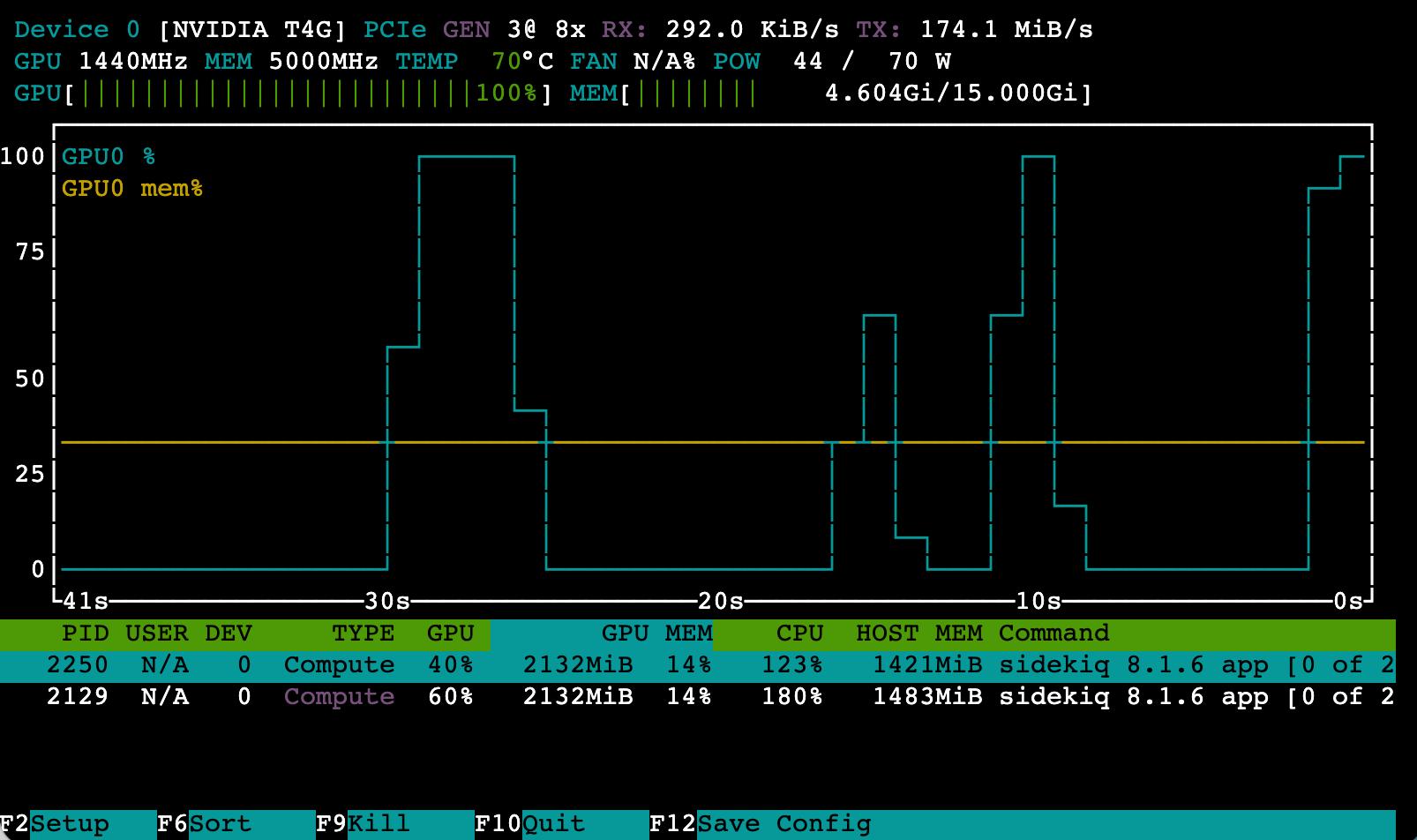
We like the convenience of building our Rails monolith app with Ruby, and to make it easy to develop and maintain AI features, we also wanted to have AI field detection within the same Ruby on Rails monolith app. To achieve this, we’ve built an AI field detection inference pipeline with Ruby and the Sidekiq async jobs processor running on an NVIDIA T4 GPU instance. The screenshot below displays nvtop NVIDIA GPU utilization by the Ruby Sidekiq process on a production GPU worker during field detection.
TensorRT with Ruby
To run computer vision models efficiently on GPUs, NVIDIA provides the TensorRT inference runtime. TensorRT exposes a C++ API, and no Ruby binding for it existed, so we built a very small single-file Rice C++ binding that links only the methods a forward pass needs: loading an engine, inspecting its tensors, binding device memory, executing, and synchronizing the CUDA stream. We made these TensorRT Ruby bindings open source under the Apache 2.0 license, available on GitHub.
gem install tensorrt
Building and installing the gem requires TensorRT and NVIDIA CUDA on the system. The entire TensorRT binding is a single TensorRT::Engine class with 11 methods:
require 'tensorrt'

engine = TensorRT::Engine.new(model_path, verbose: false)

engine.num_io_tensors                  # Number of input/output tensors
engine.get_tensor_name(index)          # Tensor name by index
engine.is_input?(name)                 # Check if tensor is input
engine.get_tensor_shape(name)          # Shape as array [1, 3, 640, 640]
engine.get_tensor_bytes(name)          # Size in bytes
engine.get_tensor_dtype(name)          # Data type, e.g. float32

engine.set_tensor_address(name, device_ptr) # Bind GPU memory

engine.execute                         # Synchronous execution
engine.enqueue                         # Asynchronous execution

engine.get_stream                      # CUDA stream handle
engine.stream_synchronize              # Wait for stream completion
The inference pipeline
The pipeline consists of three stages:
- Preprocessing. Render the PDF page and prepare the input tensor.
- Forward pass. Run the model on the GPU with TensorRT.
- Postprocessing. Convert output tensors into field coordinates on the page.
1. Preprocessing: from PDF page to input tensor
First, PDF pages are rendered with PDFium. The rendered image is scaled to the model input resolution with aspect ratio preserved, padded to a square, normalized with the standard ImageNet mean and standard deviation, and transposed from HWC to CHW layout. Image operations are performed with ruby-vips, the libvips binding, and for tensor operations we use Numo, a Ruby alternative to NumPy:
MEAN = [0.485, 0.456, 0.406].freeze
STD  = [0.229, 0.224, 0.225].freeze

scale = [resolution.to_f / image.width, resolution.to_f / image.height].min

resized = image.resize(scale, vscale: scale, kernel: :lanczos3)

pad_x = ((resolution - (image.width * scale).round) / 2.0).round
pad_y = ((resolution - (image.height * scale).round) / 2.0).round

image = resized.embed(pad_x, pad_y, resolution, resolution, background: [255, 255, 255])

# ImageNet normalization
image /= 255.0
image = (image - MEAN) / STD

img_array = Numo::SFloat.from_binary(image.write_to_memory, [resolution, resolution, 3])

input_tensor = img_array.transpose(2, 0, 1).reshape(1, 3, resolution, resolution)
2. Forward pass: running the model on the GPU
To run the forward pass, the input tensor is cast to the data type the engine declares, serialized to a binary string, written into a host buffer, and copied to GPU VRAM. Execution is started with enqueue, which submits the work and returns immediately. retrieve is then used to wait for the forward pass to complete and read the output:
def enqueue(input_tensor)
  host_ptr = FFI::MemoryPointer.new(:uint8, @input_size)
  host_ptr.write_bytes(Numo::SFloat.cast(input_tensor).to_binary)

  TensorRT::CUDA.memcpy_htod_async(@input_ptr, host_ptr, @input_size, @cuda_stream)

  @engine.enqueue # non-blocking
end

def retrieve
  @engine.stream_synchronize

  { dets: read_output(@dets_ptr, @dets_size),
    labels: read_output(@labels_ptr, @labels_size) }
end

def read_output(device_ptr, size)
  host_ptr = FFI::MemoryPointer.new(:uint8, size)

  TensorRT::CUDA.memcpy_dtoh(host_ptr, device_ptr, size)

  Numo::SFloat.from_binary(host_ptr.read_bytes(size))
end
In production these host buffers are allocated once per thread and reused across jobs, so steady state inference performs no allocation on the Ruby side. Each Sidekiq thread holds its own engine instance.
3. Postprocessing: from output tensors to form fields
The engine returns box predictions and per-class logits. Postprocessing applies a sigmoid to turn the logits into scores, takes the highest scoring class for each box, converts boxes from center to corner format, reverses the scale and padding applied during preprocessing, and discards detections below the confidence threshold. Non-maximum suppression then removes duplicate boxes over the same region, and the coordinates are normalized to the 0..1 range the form builder uses.
Each surviving detection becomes a Field object with relative page coordinates and a field type:
Field.new(type: 'text', x: 0.6123, y: 0.8402, w: 0.2510, h: 0.0338, confidence: 0.94)
Asynchronous pipelining
Since stages 1 and 3 (preprocessing and postprocessing) execute on the CPU and stage 2 (the forward pass) executes on the GPU, the CPU can sit idle waiting for the GPU forward pass, and the GPU can sit idle waiting for CPU preprocessing and postprocessing. To increase throughput we built an async pipeline where the CPU preprocesses the next PDF page while the GPU is still running the forward pass on the current one.
To achieve this we utilize TensorRT asynchronous execution, where enqueue submits work to the CUDA stream and returns without blocking, and stream_synchronize blocks until the stream completes. Separating the two calls and returning retrieve as a lambda makes the deferral explicit:
def enqueue(input:, **)
  inference.enqueue(*input)

  -> { inference.retrieve }
end
The page loop uses this to overlap the stages. The forward pass for page N is enqueued, page N+1 is rendered and preprocessed on the CPU while the GPU is executing, and the results for page N are read only after the next page’s input is prepared:
image        = prepare_page_image(doc.get_page(page_indexes.first))
current_args = inference.prepare_input(image, **prep_opts)
current_task = inference.enqueue(**current_args, **infer_opts)

page_indexes.each_with_index do |current_page_number, i|
  next_n = page_indexes[i + 1]

  if next_n # CPU preprocesses the next page while the GPU executes the current one
    next_image = prepare_page_image(doc.get_page(next_n))
    next_args  = inference.prepare_input(next_image, **prep_opts)
  end

  outputs = current_task.call # wait until the GPU completes the forward pass and read outputs

  next_task = inference.enqueue(**next_args, **infer_opts) if next_args # start the next page's forward pass, non-blocking

  fields = inference.process_outputs(outputs, **current_args, **infer_opts) # convert output tensors into field coordinates

  yield [attachment_uuid, current_page_number, fields] # publish this page's fields

  current_args = next_args
  current_task = next_task
end
CPU and GPU work overlap for the duration of the document. Measured against the same pipeline executed synchronously, this yields approximately 80% higher throughput.
Streaming results to the browser
Fields detection runs in a Sidekiq worker on the GPU instance, and to stream results back to the user’s browser over Server-Sent Events, we use Redis pub/sub to carry messages from the worker process to the web process. Using Rails Action Cable with WebSockets would be a viable option as well, but we chose to stick with a plain Rails Live SSE controller.
The worker publishes each page’s fields as soon as that page completes, allowing us to show the user a live progress indicator of the number of pages processed. The block passed to DetectFields.call is invoked once per page, from the pipelined loop shown above:
class TemplateDetectFieldsJob
  include Sidekiq::Job

  def perform(params = {})
    # ... load the template and its documents

    Templates::DetectFields.call(io, attachment: document, inference:) do |(attachment_uuid, page, fields)|
      RedisPool.call('PUBLISH', params['channel_key'], { attachment_uuid:, page:, fields: }.to_json)
    end

    RedisPool.call('PUBLISH', params['channel_key'], { completed: true }.to_json)
  end
end
On the Rails side, the SSE endpoint is a plain ActionController::Live action where we generate a channel key, subscribe to it, enqueue the job, and relay each published message back to the browser as a JSON array of detected fields:
class TemplatesDetectFieldsCloudController < ApplicationController
  include ActionController::Live

  def create
    sse = SSE.new(response.stream)

    channel_key = SecureRandom.uuid
    pubsub = RedisPool::POOL.pubsub

    pubsub.call('SUBSCRIBE', channel_key)

    TemplateDetectFieldsJob.perform_async('template_id' => @template.id, 'channel_key' => channel_key)

    loop do
      type, key, payload = pubsub.next_event(TIMEOUT)

      data = JSON.parse(payload)

      sse.write(data)

      break if data['completed'] || data['error']
    end
  ensure
    response.stream.close
  end
end
Deployment
Running TensorRT requires the runtime, a matching CUDA version, and compatible NVIDIA drivers. To avoid managing all of that ourselves, we build the Rails monolith from Dockerfile.tensorrt on the nvcr.io/nvidia/tensorrt base image, which already ships TensorRT and CUDA. We install Ruby and the application on top of the base NVIDIA TensorRT image, and the tensorrt gem compiles against the shared libraries already present in it. It is still the same single DocuSeal Rails monolith app, just built with a separate Dockerfile for GPU instances:
FROM nvcr.io/nvidia/tensorrt:25.12-py3 AS app

# ... Ruby, gems, and the Rails application

RUN gem install tensorrt -v 1.0.3

# compiled model engine, baked into the image
COPY --from=model /model.engine /app/tmp/model.engine

# the GPU container runs Sidekiq on the fields queue
CMD ["bundle", "exec", "sidekiq", "-q", "fields"]
Seven months in production
The AI field detection pipeline was built in January 2026 and has successfully run in production since, processing thousands of PDF pages per day.
Keeping everything in one monolith Rails app helps us reduce the operational overhead that a microservices architecture can lead to. Building the AI inference pipeline in Ruby took us approximately the same effort as building a Python microservice would have. The result is a Ruby AI pipeline that is simple, scalable, and reliable, with throughput exceeding that of a Python microservice.
The open-source DocuSeal app also ships field detection, using a smaller quantized model that runs on the CPU with ONNX Runtime. DocuSeal is available on GitHub, as well as the TensorRT Ruby gem.